Supaste v1.3 is here: new views, color picker, screen text capture, and more
Supaste v1.3 is now available.
This update adds new ways to organize your clips, faster access to your favorites, built-in app updates, color picking, screen text capture, and more customization across the app.
What’s new:
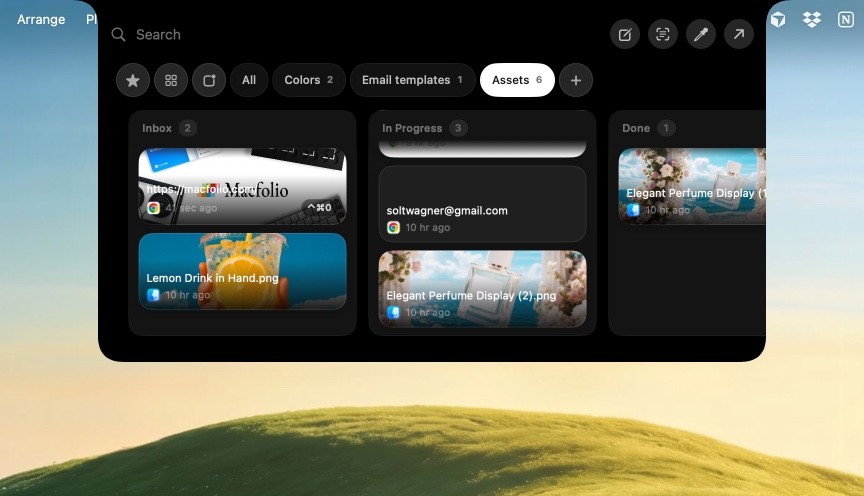
Collection Views — switch between List View, Card View, and Board View for your collections.
Custom Board Columns — organize your clips like a Kanban board with editable columns.
One-Click App Updates — when a new Supaste update is available, you’ll now get notified inside the app and can update with one click.
Color Picker — pick any color from your screen and instantly save it as a reusable color clip.
Capture Text from Screen — select text anywhere on your screen, even inside images or non-selectable areas, and save it as a clean text clip.
More Shortcut Customization — customize more shortcuts to match your workflow.
Sequential Paste — press Command + ↓ to paste your recent history clips one by one.
Favorite Clip Shortcuts — quickly paste your favorite clips with dedicated shortcuts.
Auto-Delete Unused Clips — automatically delete clips you haven’t used recently. You can customize the number of days.
Quick Shelf & Quick Paste Ordering — change the order of items in the Quick Shelf and Quick Paste window.
Default Quick Paste View — choose the default view and collection shown in the Quick Paste window.
Bug fixes and improvements — smoother, cleaner, and more reliable overall.