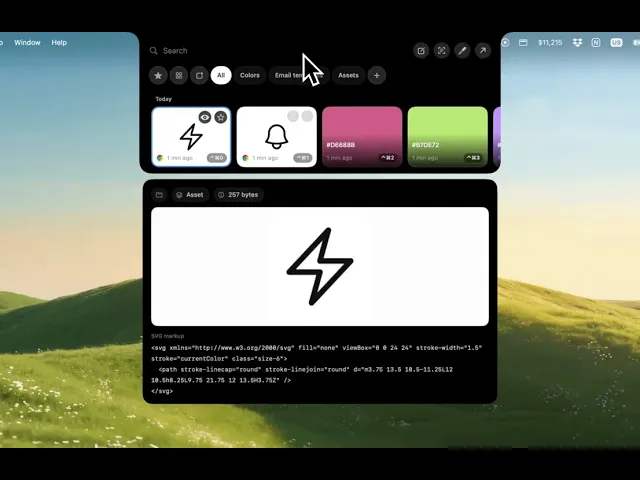
Supaste v1.5 - Preview, faster app performance
This update makes Supaste much faster, smoother, and more customizable — with a big focus on the Notch experience, previewing clips, keyboard navigation, and better clipboard control.
What’s new:
• Much faster app performance
Supaste now feels quicker and more responsive across the app.
• Preview in the Notch
You can now preview clips directly from the Notch using the preview button or the Space key.
• Keyboard navigation in the Notch
Move between clip cards with your keyboard, press Space to preview, and press Enter to paste.
• More customization options
New settings give you more control over how Supaste works and feels.
• More Notch behavior options
Choose what happens when you click a clip in the Notch — paste instantly, copy to clipboard, or use your preferred workflow.
• More copy actions
Copy text in different formats, including uppercase, lowercase, capitalized, and plain text without formatting.
• Better database handling
Clipboard history is now managed more efficiently for faster loading and smoother browsing.
• More shortcuts
Supaste now includes more keyboard shortcuts, and every shortcut can be customized.
• Lots of bug fixes
This release also includes many fixes and improvements to make Supaste more reliable.
Supaste v1.5 is a big quality-of-life update for everyone who uses clipboard history, screenshots, and the Notch every day.